
Travel Budget Template 2026: Stop Overspending (Smart Guide)
 VR Team
- December 31, 2025

Most travelers have an “Ostrich Strategy” when it comes to money: Spend now, check the bank account later.
This approach usually leads to the dreaded “Post-Trip Shock.” It is that sinking feeling you get two weeks after returning home, when the credit card bill arrives and you realize you spent double what you intended. You look at the final number and think, “How did that happen? We just ate at normal places.”
The problem isn’t that you are reckless. The problem is that a static list of expenses doesn’t work in the real world.
- Prices change between the time you plan and the time you book.
- Hidden fees (resort taxes, city taxes, baggage fees) appear out of nowhere.
- Exchange rates shift while you are sleeping.
To keep your trip stress-free, you need a clearer system. You don’t need to be an accountant to do this—you just need a travel budget template that shows you the gap between what you thought you would spend and reality.
In this guide, we will break down the “Estimated vs. Actual” logic used in a professional Google Sheets system. We will explain why “Mental Math” fails, how to automate your expense tracking, and how to use a simple spreadsheet to catch leaks before they ruin your trip.
(If you don’t want to build these formulas from scratch, you can simply grab the Travel Budget Template, which has this entire logic pre-built for you.)
1. The "Mental Math" Trap: Why You Can't Trust Your Brain
Why do most travel plans fail? Because they are static, and our brains are naturally optimistic.
When you start planning, you write down: “Hotel: $1,000.” But then you go to book it. With local city taxes, a “resort fee,” and a slightly better room view, the total comes to $1,150. You think, “It’s just $150. I’ll make it up by eating cheaper lunches.”
But you don’t write that -$150 down. You keep the original “$1,000” in your head. Then you pay $20 extra for baggage. Then $15 for travel insurance. Then $30 for a SIM card. By Day 3 of your trip, you are effectively $400 over budget, but your “Mental Math” still tells you that you are on track.
A smart travel budget template eliminates this self-deception. It acts as an unbiased tracker. It doesn’t care about your intentions; it only cares about the receipts. By forcing you to log the difference immediately, it prevents small overspends from turning into a big surprise.
2. How the Logic Works: "The Difference"
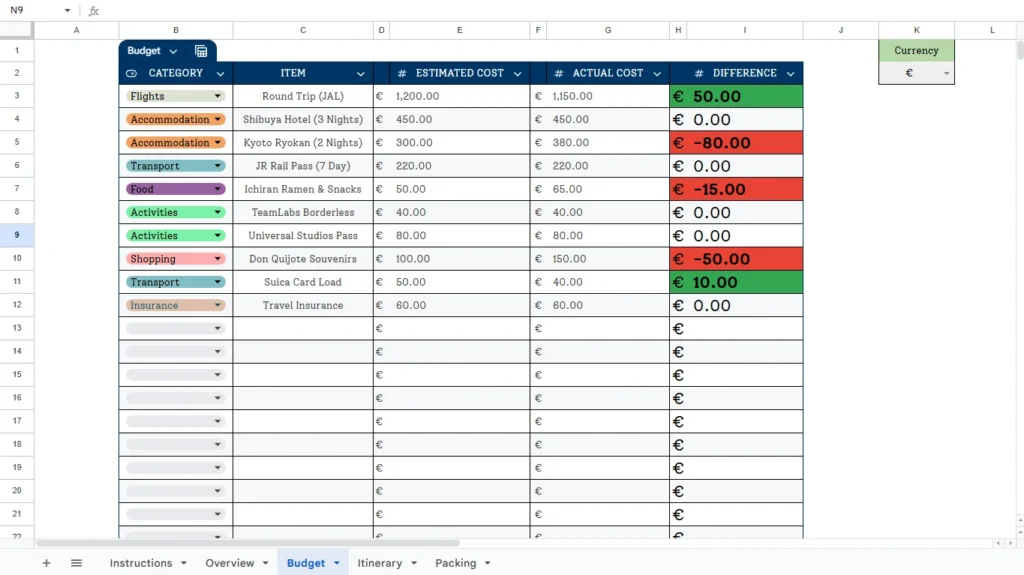
The core feature of travel budget template is simple: it compares your plan against your receipts. This stops you from lying to yourself about how much that “cheap lunch” actually cost.
Here is the exact workflow required to make this work:
- Select the Category: First, use a dropdown menu to tag the expense (e.g., Flights, Accommodation, Shopping). This helps you see where your money is going later.
- Describe the Item: Manually type in what you are paying for (e.g., “Kyoto Ryokan”).
- Input Estimated Cost: Enter what you think it will cost (e.g., €300.00).
- Input Actual Cost: After you pay, enter the real number from your receipt (e.g., €380.00).
The Automated Result
Once you enter those two numbers, the Difference column calculates the gap automatically.
- Without this sheet: You might ignore that €80 overage because it “feels” close enough.
- With this sheet: The template calculates a -$80.00 difference instantly.
This column is your “Truth Serum.” It tells you exactly how much money you have “lost” from your total trip fund in real-time.
3. The "Traffic Light" System (Visual Alerts)
Spreadsheets can be boring. Rows of black numbers tend to blur together, making it easy to miss a problem until it’s too late.
That is why a superior travel budget template uses Conditional Formatting. You don’t need to analyze the math; you just need to look at the colors in the Difference column.
- Green (Positive): The difference is greater than 0.
- What it means: You spent less than you estimated. You are under budget and have “saved” money to use elsewhere.
- Red (Negative): The difference is less than 0.
- What it means: You spent more than estimated. You are over budget on this item.
The Psychology of Color
This visual system bypasses the need for analysis. You just scan the column.
- If you see a lot of Green, you can relax and maybe upgrade your dinner plans.
- If you see a wall of Red, you know instantly that you need to stop spending.
It provides an immediate warning system that keeps you honest without you having to crunch the numbers yourself.
4. The "Four Buckets" Strategy
Another common issue is knowing where the money is going. You might feel like you are being frugal with food, yet your money is disappearing. Often, it leaks through categories you aren’t paying attention to.
By using the Category Dropdown, you can organize your spending into “Buckets”:
- Fixed Costs (Flights & Accommodation): These are usually paid upfront. Once booked, they are locked.
- Variable Costs (Food & Transport): This is where the budget usually breaks. You might budget $50 for snacks but spend $65. The category tag helps you see if “Food” is your primary problem area.
- Danger Zone (Shopping): Shopping is the easiest place to blow a budget. By isolating this category, you can see clearly if your souvenirs are eating into your food budget.
5. Capturing the "Hidden Costs"
A major flaw in most free travel budget templates or simple notes is that they forget the “Invisible” costs. These are the expenses that don’t come with a shiny receipt or a fun memory, but they drain your bank account just the same.
This logic encourages you to log these “Boring” items to ensure your final number is accurate.
- Insurance: Many travelers forget to budget for this, but it is essential.
- Transport Loads: Don’t try to log every $2 subway ride. Log the bulk cash load (e.g., “Suica Card Load: $50″) to keep the tracker clean.
- Taxes & Fees: City taxes or “Resort Fees” can add 10-15% to your hotel bill. The Actual Cost column allows you to capture this difference when you check out.
6. How to Use This Template to Save
To get the most out of this travel budget template, we recommend a structured 3-phase workflow. Do not try to do everything at once.
Phase 1: The “Dream” (Estimation)
- When: 3-6 months before the trip.
- Action: Fill out the Item and Estimated Cost columns only.
- Goal: Research rough prices for your flights and dream hotels. This gives you your “Target Budget” (e.g., $3,000). You now know exactly how much you need to save from your paycheck every month to afford this trip.
Phase 2: The “Booking” (Actuals)
- When: 1-2 months before the trip.
- Action: As soon as you book a flight or reserve a hotel, find the row and enter the receipt amount in the Actual Cost column.
- Goal: Check the Difference. Did you find a cheaper flight than expected? Great—that cell turns Green. You now have “Free Money” to allocate to a nicer dinner. Did the hotel cost more? The cell turns Red. You now know you need to cut costs elsewhere before you even leave your house.
Phase 3: The “Reality” (Tracking)
- When: During the trip.
- Action: Open the sheet on your phone once a day (maybe while waiting for breakfast). Enter your previous day’s variable expenses.
- Goal: Stay in the Green. If your “Shopping” category starts turning Red, you skip the next souvenir shop.
Conclusion: Enjoy the Trip, Forget the Math
The goal of a budget isn’t to stop you from having fun. It is to stop you from worrying.
There is nothing worse than being on a beautiful vacation but feeling a knot of anxiety in your stomach every time you tap your card. When you use a logic-driven travel budget template, you eliminate the fear of the unknown.
You know exactly what you can afford. You know exactly where you are overspending. And crucially, you know exactly how much money is left in the pot.
You can order that second cocktail on the beach with zero guilt, because your spreadsheet confirmed you are still in the Green. That peace of mind is worth more than any souvenir.
(Ready to start tracking? You can try building this spreadsheet yourself using the steps above, or save time with the Ultimate Travel Planner, which includes the Budget, Itinerary, and Dashboard tabs ready to go.)