
Stop Wasting Time: The Automated Google Sheets Habit Tracker Guide (2026)
 VR Team
- December 31, 2025

The biggest enemy of consistency isn’t laziness; it is friction. That is why the architecture of your Google Sheets habit tracker template matters more than you think.
Every micro-second you spend setting up your tools is a micro-second you aren’t doing the work. If you have to manually write out dates, draw grid lines, or navigate through five different menus just to check a box, you have already lost.
Most “standard” digital tools fail because they prioritize aesthetics over efficiency. They look pretty, but they require too much maintenance.
To build a streak that lasts a year, you need a system that feels invisible. You need a Google Sheets habit tracker template that acts as a self-driving engine.
If you are serious about efficiency in 2026, here are the 4 automation rules you must engineer into your spreadsheet to eliminate friction.
Rule 1: The "Auto-Fill" Logic (Kill Manual Entry)
The most common search term for beginners is “how to make a habit tracker.” The mistake they make is treating a spreadsheet like a piece of paper. They manually type: Jan 1, Jan 2, Jan 3…
This is a disaster waiting to happen. What if you want to start mid-year? What if you miss a week?
A professional Google Sheets habit tracker template utilizes Dynamic Date Sequencing.
- The Logic: You should never type more than ONE date.
- The Mechanism: Your sheet needs a “Setup Tab” with a calendar picker. You select your Start Date (e.g., Dec 20, 2025).
- The Automation: The entire tracking column automatically populates the next 365 days using array formulas.
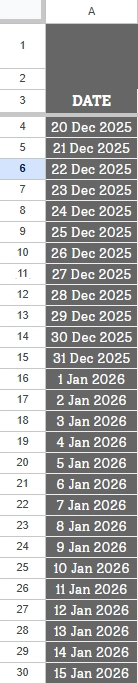
This turns a 2-hour setup job into a 2-second click. It respects your time.
Rule 2: The "Weighted" Logic (Quality Over Quantity)
“Standard” trackers have a fatal flaw: they treat every checkbox as equal. In a basic app or notebook, “Flossing your teeth” (2 minutes) gets the same checkmark as “Deep Work” (2 hours).
This creates Fake Productivity. You can check 10 easy boxes and feel successful while ignoring the one hard task that actually moves the needle.
To fix this, your Google Sheets habit tracker template must use Weighted XP (Experience Points).
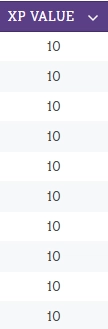
- The Input: In your dashboard, you assign a “Weight” to each habit.
- Skin Care = 10 XP
- Gym Session = 50 XP
- The Output: Your daily score isn’t just “Did I finish?” It is “How much value did I create?”
Rule 3: The "No-Script" Architecture (Stability First)
This is the most critical technical rule for 2026.
Many template creators use Google Apps Script (Javascript code) to force the sheet to do fancy things like “resetting checkboxes” or “sending email reminders.”
The Problem with Scripts:
- Security Warnings: Scripts often trigger a bright red “This App is Not Verified by Google” warning, forcing you to click through “Unsafe” menus just to open your own file.
- Breakage: If you copy the sheet incorrectly or if Google updates their API, the script breaks, and your tracker stops working.
- Speed: Scripts run on Google’s servers. Formulas run in your browser. Scripts are often laggy; formulas are instant.
The Solution: You must engineer your Google Sheets habit tracker template using 100% Native Formulas.
- Use “SPARKLINE” for graphs, not scripted charts.
- Use “CONDITIONAL FORMATTING” for visual changes, not “on Edit” triggers.
A formula-based sheet is an unbreakable sheet. It works offline, it never asks for permissions, and it will still work in 10 years.
Rule 4: The "Macro-View" Logic (Trend Visualization)
Finally, we need to solve the “Perspective Problem.” When you use a paper journal or a rigid mobile tool, you are often stuck looking at “Today.” It is hard to see the bigger picture.
A robust Google Sheets habit tracker template automates your long-term review. You need a Dashboard that runs in the background, constantly aggregating your daily inputs into annual trends.
You shouldn’t have to calculate how you are doing. Your system should tell you.
The Engineering Reality
Implementing these four rules requires a shift in how you build. You are moving from “Data Entry” (typing dates) to “System Architecture” (writing formulas).
To achieve this level of automation without scripts, you will need to master functions like ARRAYFORMULA, SEQUENCE, SUMPRODUCT, and SPARKLINE. The initial setup requires some “sweat equity” to ensure the logic flows correctly without breaking when the year changes.
However, the return on investment is massive. Once the engine is built, the friction disappears.
This “invisible logic” is the exact architecture we utilized when designing The Daily Habit Tracker. We spent dozens of hours refining the native formulas so that the user never has to deal with a single line of code or a security warning.
Whether you are building your own Google Sheets habit tracker template from scratch or adopting a pre-built system, the goal is identical: let the spreadsheet handle the math, so you can handle the habits.
Frequently Asked Questions
Why is a Google Sheets habit tracker template better than a standard habit app? Standard apps are often rigid “black boxes”—you can’t see how they work or change them. A Google Sheets habit tracker template offers total transparency. You can adjust the formulas, change the logic, and export your data instantly. It is a tool you own, not a service you rent.
Do I need to know formulas to use this? No. A well-designed Google Sheets habit tracker template (like ours) keeps the formulas hidden in the background. You only interact with the simple checkboxes and dropdown menus. The math happens automatically.
What is the difference between a Script and a Formula? A Script is external code (like a mini-program) attached to your sheet. It requires permission to run and can be a security risk. A Formula (like =SUM or =IF) is built into Google Sheets. Our templates use only formulas, ensuring they are 100% safe, fast, and never trigger security pop-ups.
Conclusion
Efficiency is not about doing more things; it is about deleting the things that don’t matter. Manually setting up dates doesn’t matter. Drawing grid lines doesn’t matter.
What matters is the habit.
By switching to an automated Google Sheets habit tracker template, you remove the administrative burden of self-improvement. You stop being a “Spreadsheet Manager” and start being a “High Performer.”
The best system is the one you don’t have to think about.