
3 Rules for an Addictive Google Sheets Habit Tracker (2026)
 VR Team
- December 31, 2025
We all start with good intentions, but consistency is a data problem, not a character flaw. You set a goal to read, run, or meditate, but without a feedback loop, these actions feel invisible. The reason video games are compelling while chores are tedious is simple: games measure progress instantly.
To fix your daily routine, you don’t need more willpower; you need a system that visualizes your effort.
For data-driven individuals, a Google Sheets habit tracker is the superior tool. It offers the flexibility that rigid mobile apps lack and the automation that paper journals cannot provide. However, a simple list of checkboxes is not enough. To actually change behavior, you need to engineer a spreadsheet that functions like a game.
Here is the exact philosophy and architectural logic required to build a Google Sheets habit tracker that makes discipline feel like leveling up.
The Philosophy: Gamification Over Guilt
Traditional tracking fails because it is binary: you either succeeded (Good) or failed (Bad). This creates a “Guilt Gap” where missing one day feels like ruining the whole streak, leading to abandonment.
A robust Google Sheets habit tracker should be built on the principle of Gamification. In a game, you earn experience points (XP) for actions. If you miss a quest, you don’t lose the game; you just don’t earn the XP for that day. This slight shift in logic changes everything. It turns your daily routine into a “Player Level” pursuit rather than a pass/fail test.
By attaching numerical value to your actions, you transform abstract goals into concrete data. This leverages immediate rewards, a core concept in behavioral design that bridges the gap between the action (doing the habit) and the long-term benefit (being healthy).
Key Components of a Gamified System
If you are designing this system, you need to move beyond simple rows and columns. Your spreadsheet needs three specific logic blocks to function effectively.
- Variable XP Logic (The “Difficulty” Setting)
Not all habits are created equal. Drinking a glass of water is easy; hitting a 90-minute gym session is hard. A basic checklist treats these two actions as identical (one checkmark). This is a logical flaw.
Your Google Sheets habit tracker must allow for Weighted Values.
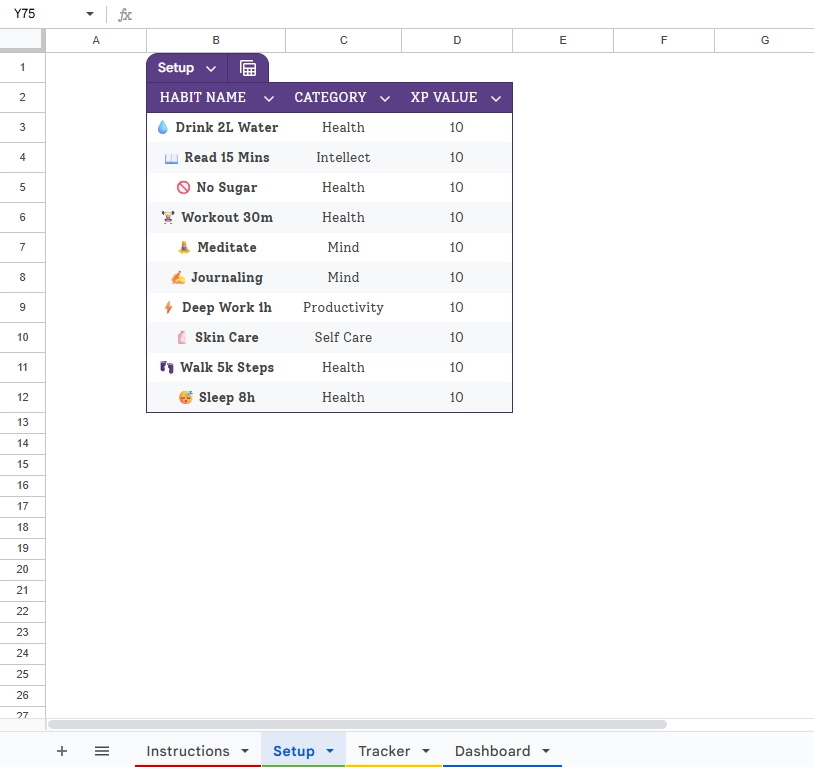
- The Setup: You need a customized table where you assign an “XP Value” to each habit.
- The Logic: Easy habits might be worth 10 XP. Difficult habits might be worth 50 XP.
- The Result: On low-energy days, you can still “score” points by doing the small tasks. This prevents the feeling of total failure.
- The Visual Feedback Loop (The “Gold” Bar)
Data visualization is essential. Scanning a wall of text checkboxes is cognitively draining. You need visual cues that trigger instant satisfaction.
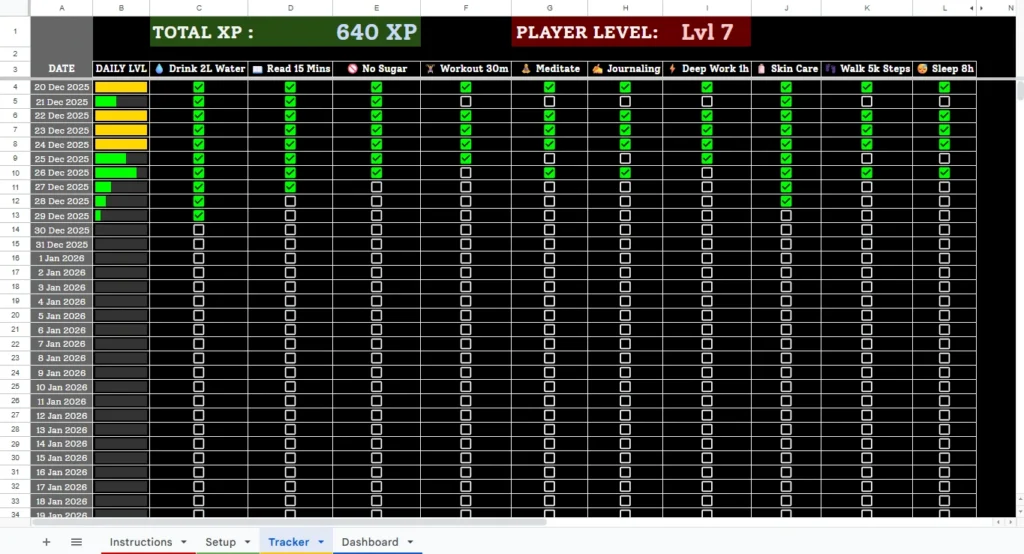
You should engineer a Daily Progress Bar for every single date row.
- Automation: As you check off boxes for a specific date (e.g., Dec 20, 2025), a bar should fill up based on the percentage of completion.
- The Reward: Use Conditional Formatting to change the color of the bar. It might start red, turn yellow at 50%, and turn a satisfying Gold only when 100% of tasks are complete. This visual “Gold” status becomes the target you chase every day.
- The Aggregate Dashboard (The “Player Profile”)
Finally, you need a high-level view. Tracking daily is tactics; tracking trends is strategy. Your system needs a Dashboard tab that aggregates the raw data from your tracking logs.
It should calculate:
- Total XP: The sum of all your weighted efforts.
- Player Level: A calculated formula that increases your “Level” as you accumulate XP (simulating an RPG game).
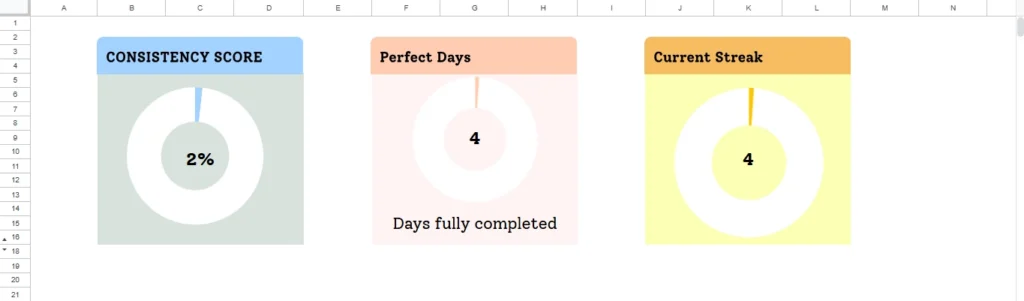
- Consistency Score: A metric that shows your streak or percentage of “Perfect Days.”
This dashboard transforms your life into a measurable character sheet.
Implementation Challenges
Understanding this logic is the first step. Building it is the second.
Creating a fully automated Google Sheets habit tracker with gamification features requires complex spreadsheet architecture.
- Date Sequencing: You need array formulas to ensure that when you pick a start date (like Jan 1, 2026), the entire year’s column updates automatically without you typing 365 dates manually.
- XP Calculation: You need SUMPRODUCT or similar formulas to multiply the specific checkboxes checked against their unique XP values set in your setup tab.
- Formatting Rules: Creating a progress bar that changes color based on completion percentage requires customized formula.
It is a rewarding project for spreadsheet enthusiasts, but it involves significant trial and error to get the math right.
The Solution: Start Playing Immediately
You can spend your weekend debugging formulas to calculate your player level, or you can start earning XP today.
We have already engineered this exact logic. The Daily Habit Tracker is a pre-built, gamified system designed to turn your routine into a game.
- Customizable Setup: Define your 10 habits and assign manual XP values based on difficulty.
- Automated Tracking: The date sequence fills automatically. The progress bars turn Gold when you hit 100%.
- Gamified Dashboard: Watch your Total XP grow and your “Player Level” rise as you remain consistent.
Frequently Asked Questions
How do I create a habit tracker in Google Sheets? To build a basic Google Sheets habit tracker, you need three elements: a column for dates, a row for your habits, and checkboxes (Insert > Checkbox). However, to make it effective, you should add conditional formatting that changes the cell color when a box is checked. This visual feedback is what separates a standard list from a gamified system.
Does Google have a built-in habit tracker? No, Google does not have a dedicated habit tracking tool. This is why a custom Google Sheets habit tracker is the preferred solution for productivity enthusiasts. It allows you to build a dashboard that integrates with your other data, offering more flexibility than rigid mobile apps or paper journals.
Is a Google Sheets habit tracker better than a mobile app? For most data-driven users, yes. While mobile apps are convenient, they often force you into a specific workflow or lock features behind subscriptions. A Google Sheets habit tracker gives you total control. You can customize the gamification logic, access your data offline, and visualize your progress with graphs that standard apps simply don’t offer.
Conclusion
Whether you build your own spreadsheet or use a template, the goal remains the same: stop relying on memory and start relying on data.
By moving your routine into a Google Sheets habit tracker, you strip away the emotion of failure. You stop worrying about “being a better person” and start focusing on “getting a high score.” That shift in perspective is often all it takes to turn a struggle into a streak.
Gamification works because it satisfies our brain’s need for progress. Give your brain the data it craves, and the habits will follow.